Computing Decoded
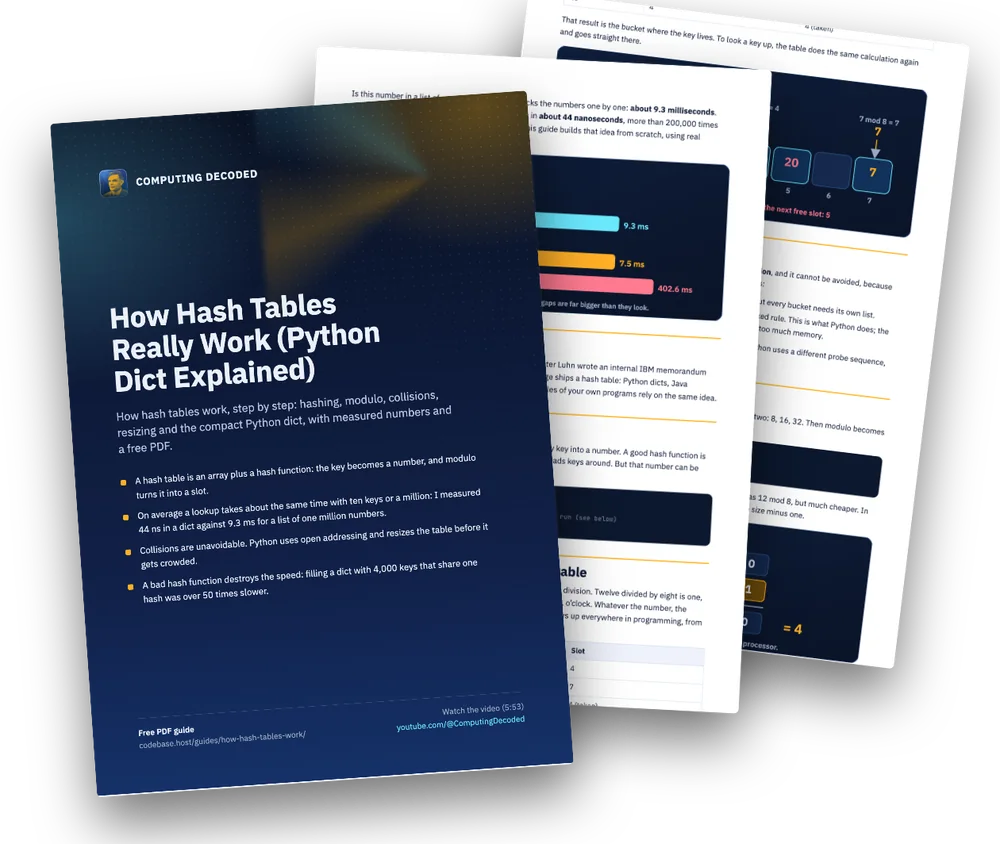
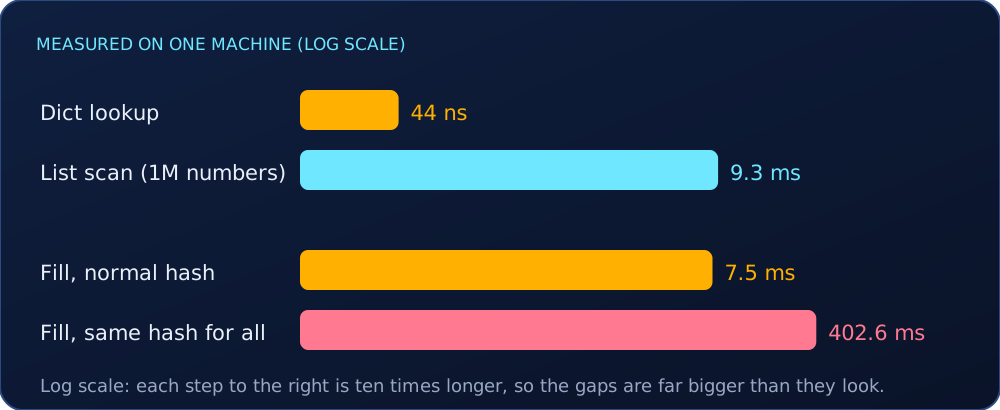
Is this number in a list of one million? Python checks the numbers one by one: about 9.3 milliseconds. Ask a dictionary the same question and it answers in about 44 nanoseconds, more than 200,000 times faster. The dictionary does not search. It jumps. This guide builds that idea from scratch, using real Python numbers.
Where it comes from
The idea dates from 1953: in January of that year, Hans Peter Luhn wrote an internal IBM memorandum that used hashing with chaining. Today every major language ships a hash table: Python dicts, Java HashMap, Go maps. Databases, caches and even the variables of your own programs rely on the same idea.
An array with a trick
A hash table is an array with a trick. A hash function turns any key into a number. A good hash function is fast, always gives the same answer for the same key, and spreads keys around. But that number can be huge, far bigger than the table.
>>> hash(12)
12
>>> hash("hello")      # a big number, different in every run (see below)
-9187034810106304368
Modulo: squeezing a number into the table
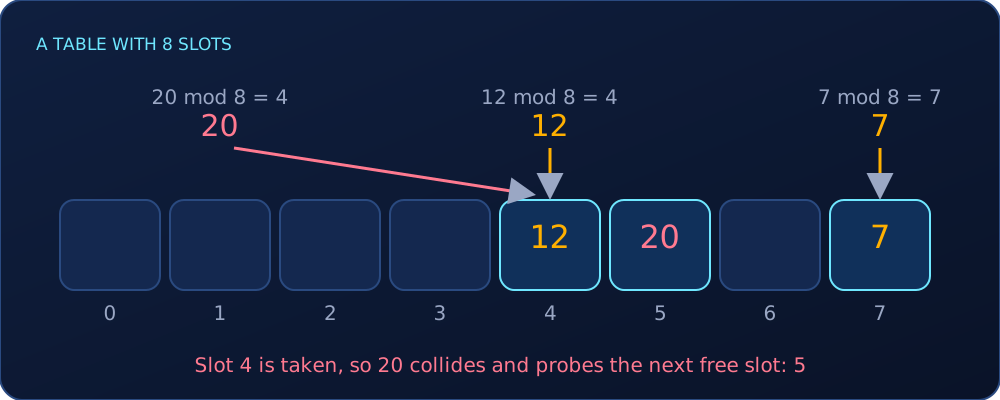
So we squeeze it into the table with modulo, the remainder after a division. Twelve divided by eight is one, with four left over, so 12 mod 8 = 4. Think of a clock: 13 o’clock is 1 o’clock. Whatever the number, the result is always between 0 and 7 for a table of 8 slots. Modulo shows up everywhere in programming, from wrapping an index around to checking if a number is even.
| Key | Key mod 8 | Slot |
|---|---|---|
| 12 | 4 | 4 |
| 7 | 7 | 7 |
| 20 | 4 | 4 (taken) |
That result is the bucket where the key lives. To look a key up, the table does the same calculation again and goes straight there.
Collisions
Now key 20: 20 mod 8 is also 4. Two keys in one bucket is a collision, and it cannot be avoided, because there are more possible keys than slots. There are two classic fixes:
- Chaining: each bucket holds a small list. It is easy to picture, but every bucket needs its own list.
- Open addressing: if the slot is taken, probe another slot by a fixed rule. This is what Python does; the comments in CPython’s
dictobject.csay chaining would cost too much memory.
In the diagrams the probe goes to the next free slot, for clarity. CPython uses a different probe sequence, but the idea is the same.
A faster modulo
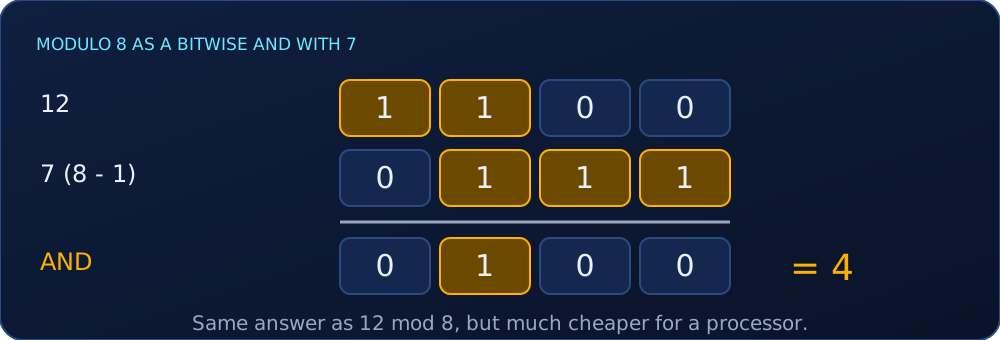
Computers have a faster way. Python keeps the table size a power of two: 8, 16, 32. Then modulo becomes a bitwise AND with the size minus one:
12      = 1100
7 (8-1) = 0111
AND     = 0100  → 4
AND keeps only the last three bits, so 12 AND 7 = 4, the same answer as 12 mod 8, but much cheaper. In CPython the first probe index is hash & mask, where mask is the table size minus one.
Finding a key
To find a key: hash it, jump to its slot, and compare. Usually that is one step, even with a million keys. That is the real promise: on average, a lookup takes about the same time with ten keys or with a million.
Compact and ordered
Since Python 3.6, dicts are compact. A small table of indexes points into an array of entries, and the entries stay in the order you inserted them. That is why dictionaries keep insertion order, which is guaranteed since Python 3.7. It also saves memory, because the index table is small. When you loop over a dict, Python just walks that array from start to end.
Resizing
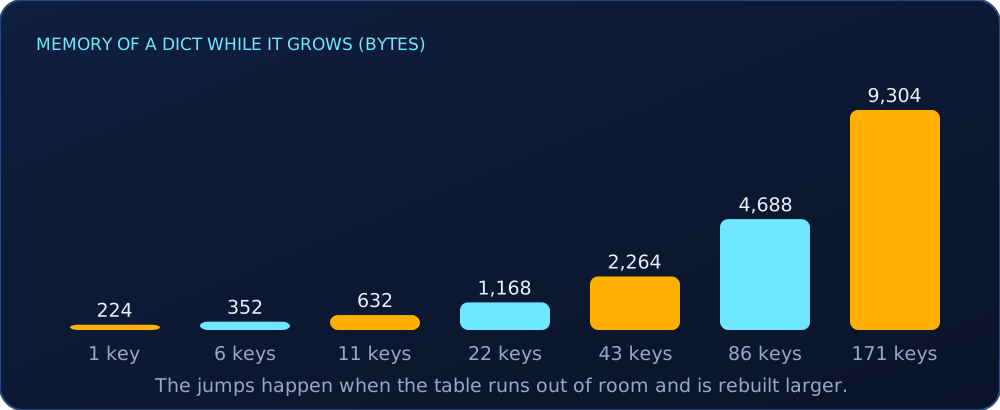
A crowded table has more collisions, so tables resize. A Python dict starts with 8 slots and can use 5 of them (the growth rule keeps it from getting more than about two thirds full). I measured sys.getsizeof while adding keys one at a time on Python 3.14.7:
| Keys in the dict | Memory (bytes) |
|---|---|
| 1 | 224 |
| 6 | 352 |
| 11 | 632 |
| 22 | 1,168 |
| 43 | 2,264 |
| 86 | 4,688 |
| 171 | 9,304 |
Memory jumps at the 6th key, then the 11th, 22nd and 43rd, and each time the number of slots roughly doubles. Resizing is expensive but rare, so the average cost of an insertion stays cheap, even though some insertions are slow.
Rehashing
When the table grows, every key is placed again. With 16 slots, 12 goes to slot 12, 7 to 7 and 15 to 15; only 20 and 4 still share a bucket. Fewer collisions, at the price of moving every key once.
A bad hash ruins everything
A bad hash function ruins everything, and this one is measurable. I filled a dictionary with 4,000 keys that all had the same hash:
class Bad:
    def __init__(self, v): self.v = v
    def __hash__(self): return 1            # every key collides
    def __eq__(self, other): return self.v == other.v

d = {}
for i in range(4000):
d[Bad(i)] = i # slow: each insert probes past all earlier keys| Filling a dict with 4,000 keys | Time |
|---|---|
| Normal hash | 7.5 ms |
| Same hash for all keys | 402.6 ms |
Over 50 times slower, because every insertion had to scan the keys already there. That is why hash functions are designed to spread keys evenly.
Randomized hashes, and why keys must be hashable
Python randomizes the hashes of strings and bytes in every run. The same string gives two different numbers in two runs (-9187034810106304368 and 4382551780164654600 in my test). This protects servers from attackers who craft colliding keys. You can control it with PYTHONHASHSEED.
And keys must be hashable: a list cannot be a key.
>>> {[1, 2]: "x"}
TypeError: cannot use 'list' as a dict key (unhashable type: 'list')
If a key could change, its hash would change, and the slot would be lost. Strings, numbers, and tuples of those can be keys, because they cannot change.
Try it yourself
import timeit
n = 1_000_000
data_list = list(range(n))
data_dict = dict.fromkeys(data_list)

print(timeit.timeit("999999 in data_list", globals=globals(), number=100) / 100)   # ~ms
print(timeit.timeit("999999 in data_dict", globals=globals(), number=1_000_000) / 1_000_000)  # ~ns
Your numbers will differ from mine; the ratio will not.
Cheat sheet
- hash(key) → big number → mod table size → slot.
- Power-of-two sizes turn modulo into
hash & (size - 1). - Collision: two keys, one slot. Python probes another slot (open addressing).
- Tables resize before they get crowded (about two thirds full), and every key is rehashed.
- A dict keeps insertion order (guaranteed since 3.7).
- Keys must be hashable; a bad hash makes lookups slow.
Sources
- Wikipedia, “Hash table”: Luhn’s 1953 IBM memorandum; built-in hash tables in Python, Java and Go: https://en.wikipedia.org/wiki/Hash_table
- CPython,
Objects/dictobject.c: open addressing, compact and ordered dicts,hash & mask, usable fraction: https://github.com/python/cpython/blob/main/Objects/dictobject.c - Python docs, “Mapping types”: insertion order guaranteed since 3.7: https://docs.python.org/3/library/stdtypes.html
- Python docs, command line (
PYTHONHASHSEED,-R): https://docs.python.org/3/using/cmdline.html - Measured with CPython 3.14.7 on one macOS machine, 2026-11-02: a list scan of 1,000,000 numbers (9.27 ms) against a dict lookup (44 ns),
sys.getsizeofgrowth, and filling a dict with 4,000 keys (7.5 ms with a normal hash, 402.6 ms with one shared hash).
Glossary
- Hash function
- A function that turns any key into a number, always the same number for the same key.
- Bucket (slot)
- A position in the table where an entry can live.
- Modulo
- The remainder after a division. It squeezes a big number into the size of the table.
- Collision
- Two different keys that land in the same slot.
- Chaining
- A collision fix where each bucket holds a small list.
- Open addressing
- A collision fix where a taken slot makes you probe another slot by a fixed rule. Python uses it.
- Resizing
- Rebuilding the table larger before it gets crowded.
- Rehashing
- Placing every key again after the table grows.
- Hashable
- An object whose hash never changes, so it can be a key: strings, numbers and tuples of those.
Practice
Try these before opening the answers.
Compute 25 mod 8 and 25 AND 7. Are they equal?
25 mod 8 = 1. In binary 25 is 11001 and 7 is 00111, so the AND is 00001 = 1. Yes, they are equal.
A table of 8 slots has keys in slots 4 and 5. Where does a new key with hash 12 go, if you probe the next slot?
12 mod 8 = 4 is taken, 5 is taken, so it goes to slot 6.
Why can a list not be a dictionary key?
A list can change, so its hash would change and the entry would be lost. That is why it is unhashable.
Why is a lookup in a list of one million numbers so much slower than in a dict?
The list is scanned one number at a time. The dict hashes the key and jumps straight to its slot.
Frequently asked questions
Why is a dictionary lookup so fast?
It does not search. It hashes the key, computes a slot from the hash, and goes straight there. On average that takes about the same time whether the table has ten keys or a million.
What is a hash collision?
It happens when two different keys land in the same slot. Chaining stores a small list in each bucket; open addressing, which Python uses, probes another slot by a fixed rule.
Why must dictionary keys be hashable?
The slot is computed from the hash. If a key could change, its hash would change and the entry would be lost. That is why a list cannot be a key, while strings, numbers and tuples of those can.
Do Python dicts keep insertion order?
Yes. Dictionary order is guaranteed to be insertion order since Python 3.7, and it was an implementation detail of CPython from 3.6.
Keep this guide: free PDF
9 pages with the diagrams, the code, a glossary and practice questions, ready to print or save.
Free, 9 pages. The email is optional: leave it empty and the PDF downloads anyway. If you add it, I send new guides and nothing else. Privacy